

ביסוס בעזרת
לביסוס בעזרת
- לשפר את הדיוק העובדתי: להפחית את ההזיות של המודל על ידי ביסוס התשובות על מסד הנתונים של Google, שכולל יותר מ-250 מיליון מקומות ועסקים בעולם האמיתי.
- לגשת למידע בזמן אמת: לענות על שאלות באמצעות נתונים בזמן אמת, כמו שעות הפעילות הנוכחיות והסטטוס בזמן אמת של תחנות טעינה לרכב חשמלי.
- לספק מקורות: כדי לבנות אמון עם המשתמשים, כדאי להציג
Google Maps מקורות וקישורים למקומות ישירות לצד הטענות של המודל שמבוססות על מיקום.
מודלים נתמכים
gemini-4-argon-
gemini-3.8-flash(והגרסאות הישנות יותרgemini-3.7-flash,gemini-3.6-flashו-gemini-3.5-flash) -
gemini-3.5-flash-lite(והגרסה הישנה יותרgemini-3.1-flash-lite)
גם המודלים gemini-3.1-pro-preview ו-Gemini 2.5 לשימוש כללי (שיצאו משימוש) תומכים ביכולת הזו.
שפות נתמכות
רשימת השפות הנתמכות במודלים של Gemini.
איך מבססים את המודל באמצעות Google Maps
|
כדי לראות תוכן וקוד שספציפיים לספק, לוחצים על הספק Gemini API בדף הזה. |
כשיוצרים את המכונה של GenerativeModel, צריך לספק את GoogleMaps בתור tool שהמודל יכול להשתמש בו כדי ליצור את התשובה שלו.
Swift
import CoreLocation
import FirebaseAILogic
// Initialize the Gemini Developer API backend service.
let ai = FirebaseAI.firebaseAI(backend: .googleAI())
// Example: Coordinates for New York City
let latAndLong = CLLocationCoordinate2D(latitude: 40.7128, longitude: -74.0060)
// (Optional) Define a RetrievalConfig to configure the Grounding with Google Maps tool.
// You can optionally provide a location's coordinates and/or a language code
// for more relevant and personalized Google Maps results.
let retrievalConfig = RetrievalConfig(
location: latAndLong,
// Example: Language code for English (US).
languageCode: "en-US"
)
// Wrap the RetrievalConfig inside a ToolConfig.
let toolConfig = ToolConfig(retrievalConfig: retrievalConfig)
// Create a `GenerativeModel` instance with a model that supports your use case.
let model = ai.generativeModel(
modelName: "GEMINI_MODEL_NAME",
// Provide Google Maps as a tool that the model can use to generate its response.
tools: [.googleMaps()],
// Add the configuration for the Grounding with Google Maps tool
// (if this optional config was defined above).
toolConfig: toolConfig
)
let response = try await model.generateContent("restaurants near me?")
print(response.text ?? "No text in response.")
// Make sure to comply with the "Grounding with Google Maps " usage requirements,
// which includes how you meet service usage requirements
Kotlin
// (Optional) Define a RetrievalConfig to configure the Grounding with Google Maps tool.
// You can optionally provide a location's coordinates and/or a language code
// for more relevant and personalized Google Maps results.
val retrievalConfig = RetrievalConfig(
// Example: Coordinates for New York City
latLng = LatLng(latitude = 40.7128, longitude = -74.0060),
// Example: Language code for English (US)
languageCode = "en-US"
)
// Wrap the RetrievalConfig inside a ToolConfig.
val toolConfig = ToolConfig(
retrievalConfig = retrievalConfig
)
// Initialize the Gemini Developer API backend service.
// Create a `GenerativeModel` instance with a model that supports your use case.
val model = Firebase.ai(backend = GenerativeBackend.googleAI()).generativeModel(
modelName = "GEMINI_MODEL_NAME",
// Add the configuration for the Grounding with Google Maps tool
// (if this optional config was defined above).
toolConfig = toolConfig,
// Provide Google Maps as a tool that the model can use to generate its response.
tools = listOf(Tool.googleMaps())
)
val response = model.generateContent("restaurants near me?")
print(response.text)
// Make sure to comply with the "Grounding with Google Maps " usage requirements,
// which includes how you meet service usage requirements
Java
// (Optional) Define a ToolConfig to configure the Grounding with Google Maps tool.
// You can optionally provide a location's coordinates and/or a language code
// for more relevant and personalized Google Maps results.
ToolConfig toolConfig = new ToolConfig(
null,
new RetrievalConfig(
// Example: Coordinates for New York City.
new LatLng(40.7128, -74.0060),
// Example: Language code for English (US).
"en-US"
)
);
// Initialize the Gemini Developer API backend service.
// Create a `GenerativeModel` instance with a model that supports your use case.
GenerativeModel ai = FirebaseAI.getInstance(GenerativeBackend.googleAI())
.generativeModel("GEMINI_MODEL_NAME",
null,
null,
// Provide Google Maps as a tool that the model can use to generate its response.
List.of(Tool.googleMaps()),
// Add the configuration for the Grounding with Google Maps tool
// (if this optional config was defined above).
toolConfig);
// Use the GenerativeModelFutures Java compatibility layer which offers
// support for ListenableFuture and Publisher APIs.
GenerativeModelFutures model = GenerativeModelFutures.from(ai);
ListenableFuture response = model.generateContent("restaurants near me?");
Futures.addCallback(response, new FutureCallback() {
@Override
public void onSuccess(GenerateContentResponse result) {
String resultText = result.getText();
System.out.println(resultText);
}
@Override
public void onFailure(Throwable t) {
t.printStackTrace();
}
}, executor);
// Make sure to comply with the "Grounding with Google Maps " usage requirements,
// which includes how you meet service usage requirements
Web
import { initializeApp } from "firebase/app";
import { getAI, getGenerativeModel, GoogleAIBackend } from "firebase/ai";
// TODO(developer): Replace the following with your app's Firebase configuration
// See: https://firebase.google.com/docs/web/learn-more#config-object
const firebaseConfig = {
// ...
};
// Initialize FirebaseApp
const firebaseApp = initializeApp(firebaseConfig);
// Initialize the Gemini Developer API backend service.
const ai = getAI(firebaseApp, { backend: new GoogleAIBackend() });
// (Optional) Define a toolConfig to configure the Grounding with Google Maps tool.
// You can optionally provide a location's coordinates and/or a language code
// for more relevant and personalized Google Maps results.
const toolConfig = {
retrievalConfig: {
// Example: Coordinates for New York City
latLng: {
latitude: 40.7128,
longitude: -74.0060
},
// Example: Language code for English (US)
languageCode: 'en-US'
}
};
// Create a `GenerativeModel` instance with a model that supports your use case
const model = getGenerativeModel(
ai,
{
model: "GEMINI_MODEL_NAME",
// Provide Google Maps as a tool that the model can use to generate its response.
tools: [ { googleMaps: {} } ],
// Add the configuration for the Grounding with Google Maps tool
// (if this optional config was defined above).
toolConfig
}
);
const result = await model.generateContent("restaurants near me?");
console.log(result.response.text());
// Make sure to comply with the "Grounding with Google Maps " usage requirements,
// which includes how you meet service usage requirements
Dart
import 'package:firebase_core/firebase_core.dart';
import 'package:firebase_ai/firebase_ai.dart';
import 'firebase_options.dart';
// Initialize FirebaseApp.
await Firebase.initializeApp(
options: DefaultFirebaseOptions.currentPlatform,
);
// (Optional) Define a ToolConfig to configure the Grounding with Google Maps tool.
// You can optionally provide a location's coordinates and/or a language code
// for more relevant and personalized Google Maps results.
final toolConfig = ToolConfig(
retrievalConfig: RetrievalConfig(
// Example: Coordinates for New York City.
latLng: LatLng(latitude: 40.712728, longitude: -74.006015),
// Example: Language code for English (US).
languageCode: 'en-US',
),
);
// Initialize the Gemini Developer API backend service.
// Create a `GenerativeModel` instance with a model that supports your use case.
final model = FirebaseAI.googleAI().generativeModel(
model: 'GEMINI_MODEL_NAME',
// Provide Google Maps as a tool that the model can use to generate its response.
tools: [
Tool.googleMaps(),
],
// Add the configuration for the Grounding with Google Maps tool
// (if this optional config was defined above).
toolConfig: toolConfig,
);
final response = await model.generateContent([Content.text("restaurants near me?")]);
print(response.text);
// Make sure to comply with the "Grounding with Google Maps " usage requirements,
// which includes how you meet service usage requirements
Unity
using Firebase;
using Firebase.AI;
// Initialize the Gemini Developer API backend service.
var ai = FirebaseAI.GetInstance(FirebaseAI.Backend.GoogleAI());
// Example: Coordinates for New York City
var latLng = new LatLng(40.7128, -74.0060);
// (Optional) Define a RetrievalConfig to configure the Grounding with Google Maps tool.
// You can optionally provide a location's coordinates and/or a language code
// for more relevant and personalized Google Maps results.
var retrievalConfig = new RetrievalConfig(latLng, languageCode: "en");
// Wrap the RetrievalConfig inside a ToolConfig.
var toolConfig = new ToolConfig(retrievalConfig: retrievalConfig);
// Create a `GenerativeModel` instance with a model that supports your use case.
var model = ai.GetGenerativeModel(
modelName: "GEMINI_MODEL_NAME",
// Provide Google Maps as a tool that the model can use to generate its response.
tools: new[] { new Tool(new GoogleMaps()) },
// Add the configuration for the Grounding with Google Maps tool
// (if this optional config was defined above).
toolConfig: toolConfig
);
var response = await model.GenerateContentAsync("restaurants near me?");
UnityEngine.Debug.Log(response.Text ?? "No text in response.");
// Make sure to comply with the "Grounding with Google Maps " usage requirements,
// which includes how you meet service usage requirements
איך בוחרים מודל שמתאימים לתרחיש לדוגמה ולאפליקציה.
שיטות מומלצות וטיפים לשיפור התוצאות
בקטע הזה מתוארות כמה שיטות מומלצות כלליות לשימוש ב-Grounding עם
המלצות כלליות
ספקו את הכלי רק כשצריך: כדי לשפר את הביצועים והעלות, תנו למודל גישה לכלי "ביסוס בעזרת
Google Maps " רק כשיש הקשר גיאוגרפי ברור לתרחיש לדוגמה.לספק את מיקום המשתמש: כדי לקבל את התשובות הכי רלוונטיות ומותאמות אישית (וכשמיקום המשתמש ידוע), צריך לכלול את מיקום המשתמש (באמצעות קו רוחב וקו אורך דרך
latLng) בהגדרת הכלי "ביסוס עובדות באמצעותGoogle Maps ".ליידע את משתמשי הקצה: צריך להסביר למשתמשי הקצה בצורה ברורה שהנתונים של
Google Maps משמשים למענה על השאילתות שלהם. כדי להשתמש בכלי "ביסוס בעזרתGoogle Maps ", אתם צריכים לספק למשתמשי הקצה את המקורות מ-Google Maps . זוהי דרישה לשימוש בשירות.
שימוש במאפייני מקומות בהנחיות
בקטע הזה מפורטים מאפייני המקומות שמשמשים לתיאור מיקומים, ומשמשים את Grounding with
מאפייני מקום לדוגמה
הרשימה הזו כוללת דוגמאות למאפיינים של מקומות, בסדר אלפביתי, שהמודל יכול להשתמש בהם כדי ליצור תשובות.
- כתובת
- איסוף מדלת העסק
- כרטיס חיוב מיידי
- מרחק
- מגרש חניה בחינם
- מוזיקה חיה
- תפריט לילדים
- שעות פתיחה
- אמצעי תשלום (כמו מזומן או כרטיס אשראי)
- תשובה לשאלה על מקום
- ידידותי לחיות מחמד
- מגישים בירה
- מגישים במקום אוכל צמחוני
- יש נגישות לכיסא גלגלים
- Wifi
תשובות לשאלות על מקומות הן תגובה מ-Grounding with
הנחיות לדוגמה שמשתמשות במאפייני מקומות
בדוגמאות הבאות נעשה שימוש במאפייני מקום בהנחיות לגבי סוגים שונים של מקומות. כדי להבין את הכוונה שלכם ולספק תשובות רלוונטיות על סמך הנתונים שמשויכים למקומות ב-
תכנון ארוחת ערב משפחתית: בודקים אם המסעדה מתאימה למשפחה ואם היא מציעה שירות נוח.
- הנחיה לדוגמה: האם "המסעדה האיטלקית" מתאימה לילדים, והאם יש שם אפשרות לטייק אוויי? מה הדירוג שלהם?
לבדוק את הנגישות בשביל חבר: לבדוק אם המיקום עונה על צורכי נגישות ספציפיים.
- דוגמה להנחיה: אני מחפש מסעדה עם כניסה נגישה לכיסאות גלגלים.
למצוא מקום לנשנוש לילי: למצוא מקום פתוח שמגיש ארוחה מסוימת בשעה מסוימת.
- הנחיה לדוגמה: האם "Burger Joint" פתוח עכשיו? מגישים שם ארוחת ערב? מהן שעות הפתיחה של העסק ביום שישי?
פגישה עם לקוח בבית קפה: בודקים אם בית קפה מתאים לפגישה עסקית על סמך השירותים, התפריט ואפשרויות התשלום.
- הנחיה לדוגמה: האם יש Wi-Fi ב "קפה מרכזי"? מגישים שם קפה? מהי רמת המחירים שלהם, והאם הם מקבלים כרטיסי אשראי?
חשוב לזכור שהמידע ב
איך פועל ביסוס בעזרת Google Maps
כשאתם מספקים למודל את הכלי GoogleMaps, המודל מטפל בכל תהליך העבודה של חיפוש, עיבוד וציטוט מידע באופן אוטומטי.
תהליך העבודה של המודל:
קבלת הנחיה: האפליקציה שולחת הנחיה למודל Gemini כשהכלי
GoogleMapsמופעל.ניתוח ההנחיה: המודל מנתח את ההנחיה ובודק אם
Google Maps יכול לשפר את התשובה, למשל אם ההנחיה כוללת הקשר גיאוגרפי (כמו "בתי קפה בסביבה", "מוזיאונים בתל אביב").הפעלת הכלי: המודל מזהה את הכוונה הגיאוגרפית ומפעיל את הכלי "ביסוס בעזרת
Google Maps ".שליחת שאילתות אל
Google Maps : שירות הביסוס באמצעותGoogle Maps שולח שאילתות אלGoogle Maps כדי לקבל מידע רלוונטי (לדוגמה, מקומות, ביקורות, תמונות, כתובות, שעות פתיחה).כדי לקבל תוצאות רלוונטיות ומותאמות אישית יותר מ-
Google Maps , אפשר לכלול את קו הרוחב וקו האורך בהגדרות של הכלי (או אפילו ישירות בהנחיה). הכלי הוא כלי לחיפוש טקסטואלי והוא פועל באופן דומה לחיפוש ב-Google Maps , בכך ששאילתות מקומיות ("בקרבת מקום") ישתמשו בקואורדינטות, בעוד ששאילתות ספציפיות או לא מקומיות לא צפויות להיות מושפעות מהמיקום המפורש.עיבוד התוצאות של
Google Maps : המודל מעבד את התוצאות שלGoogle Maps ומנסח תשובה להנחיה המקורית.החזרת תוצאה מבוססת-
Google Maps : המודל מחזיר תשובה סופית וידידותית למשתמש שמבוססת על תוצאות מ-Google Maps . התשובה הזו כוללת:- התשובה בטקסט של המודל.
- אובייקט
groundingMetadataעם התוצאות והמקורות שלGoogle Maps .
חשוב לזכור שגם אם מספקים למודל את groundingMetadata, ולכן היא לא תוצאה מבוססת-קרקע של
הסבר על התוצאה המעוגנת
אם המודל מבסס את התשובה שלו על תוצאות מ-groundingMetadata שמכיל נתונים מובְנים שחיוניים לאימות טענות ולבניית חוויית מקור עשירה באפליקציה.
האובייקט groundingMetadata בתוצאה מבוססת-קרקע של
-
groundingChunks: מערך של אובייקטים שמכילים את המקורות שלmaps(uri,placeIdו-title). -
groundingSupports: מערך של קטעים שמקשרים בין התשובה של המודלtextלמקורות ב-groundingChunks. כל קטע מקשר בין טקסטsegment(שמוגדר על ידיstartIndexו-endIndex) לביןgroundingChunkIndicesאחד או יותר. השדה הזה עוזר לכם ליצור קישורים למקורות בגוף הטקסט. בהמשך הדף מוסבר איך לעמוד בדרישות השימוש בשירות.
זוהי דוגמה לתשובה שכוללת אובייקט groundingMetadata:
{
  "candidates": [
    {
      "content": {
        "parts": [
          {
            "text": "CanteenM is an American restaurant with..."
          }
        ],
        "role": "model"
      },
      "groundingMetadata": {
        "groundingChunks": [
          {
            "maps": {
              "uri": "https://maps.google.com/?cid=13100894621228039586",
              "title": "Heaven on 7th Marketplace",
              "placeId": "places/ChIJ0-zA1vBZwokRon0fGj-6z7U"
            }
          }
        ],
        "groundingSupports": [
          {
            "segment": {
              "startIndex": 0,
              "endIndex": 79,
              "text": "CanteenM is an American restaurant with a 4.6-star rating and is open 24 hours."
            },
            "groundingChunkIndices": [0]
          }
        ]
      }
    }
  ]
}
דרישות לגבי השימוש בשירות
בקטע הזה מתוארות הדרישות לשימוש בשירות "ביסוס בעזרת
הודעה למשתמשים על Google Maps מקורות
לכל groundingChunks שתומכים בכל תשובה. מוחזרים גם המטא-נתונים הבאים:
- URI במקור
- כותרת
- מזהה
כשמציגים באפליקציה תוצאות של ביסוס באמצעות
המקורות של
Google Maps חייבים להופיע מיד אחרי התוכן שנוצר שהמקורות תומכים בו. התוכן שנוצר נקרא גםGoogle Maps תוצאה מבוססת-קרקע.המשתמש צריך להיות מסוגל לראות את
Google Maps המקורות באינטראקציה אחת.
כך מקבלים ערכים להצגת מקורות מ-
Swift
// ...

// Get the model's response
let text = response.text

// Get the grounding metadata
if let candidate = response.candidates.first,
   let groundingMetadata = candidate.groundingMetadata {

  // Get sources
  let groundingChunks = groundingMetadata.groundingChunks
  for chunk in groundingChunks {
    if let maps = chunk.maps {
      let title = maps.title  // for example, "Heaven on 7th Marketplace"
      let url = maps.url  // for example, "https://maps.google.com/?cid=13100894621228039586"
      let placeID = maps.placeID  // for example, "places/ChIJ0-zA1vBZwokRon0fGj-6z7U"
      // TODO(developer): show source in the UI
    }
  }
}
Kotlin
// ...

// Get the model's response
val text = response.text

// Get the grounding metadata
val groundingMetadata = response.candidates.firstOrNull()?.groundingMetadata

// Get sources
val groundingChunks = groundingMetadata?.groundingChunks
groundingChunks?.let { chunks ->
  for (chunk in chunks) {
    val title = chunk.maps?.title  // for example, "Heaven on 7th Marketplace"
    val uri = chunk.maps?.uri  // for example, "https://maps.google.com/?cid=13100894621228039586"
    val placeId = chunk.maps?.placeId  // for example, "places/ChIJ0-zA1vBZwokRon0fGj-6z7U"
    // TODO(developer): show source in the UI
  }
}
Java
// ...

Futures.addCallback(response, new FutureCallback() {
  @Override
  public void onSuccess(GenerateContentResponse result) {
    // Get the model's response
    String text = result.getText();

    // Get the grounding metadata
    GroundingMetadata groundingMetadata =
        result.getCandidates()[0].getGroundingMetadata();

    if (groundingMetadata != null) {
      // Get sources
      List chunks = groundingMetadata.getGroundingChunks();
      if (chunks != null) {
        for(GroundingChunk chunk : chunks) {
          GoogleMapsGroundingChunk maps = chunk.getMaps();
          if (maps != null) {
            String title = maps.getTitle();  // for example, "Heaven on 7th Marketplace"
            String uri = maps.getUri();  // for example, "https://maps.google.com/?cid=13100894621228039586"
            String placeId = maps.getPlaceId();  // for example, "places/ChIJ0-zA1vBZwokRon0fGj-6z7U"
            // TODO(developer): show sources in the UI
          }
        }
      }
    }
  }

  @Override
  public void onFailure(Throwable t) {
    t.printStackTrace();
  }
}, executor);
Web
// ...

// Get the model's text response
const text = result.response.text();

// Get the grounding metadata
const groundingMetadata = result.response.candidates?.[0]?.groundingMetadata;

// Get sources
const groundingChunks = groundingMetadata?.groundingChunks;
if (groundingChunks) {
  for (const chunk of groundingChunks) {
    const title = chunk.maps?.title;  // for example, "Heaven on 7th Marketplace"
    const uri = chunk.maps?.uri;  // for example, "https://maps.google.com/?cid=13100894621228039586"
    const placeId = chunk.maps?.placeId;  // for example, "places/ChIJ0-zA1vBZwokRon0fGj-6z7U"
    // TODO(developer): show sources in the UI
  }
}
Dart
// ...

// Get the model's response
final text = response.text;

// Get the grounding metadata
final groundingMetadata = response.candidates.first.groundingMetadata;

// Get sources
final groundingChunks = groundingMetadata?.groundingChunks;
if (groundingChunks != null) {
  for (var chunk in groundingChunks) {
    final title = chunk.maps?.title;  // for example, "Heaven on 7th Marketplace"
    final uri = chunk.maps?.uri;  // for example, "https://maps.google.com/?cid=13100894621228039586"
    final placeId = chunk.maps?.placeId;  // for example, "places/ChIJ0-zA1vBZwokRon0fGj-6z7U"
    // TODO(developer): show sources in the UI
  }
}
Unity
// ...

// Get the model's response.
var text = response.Text;

// Get the grounding metadata.
var groundingMetadata = response.Candidates.First().GroundingMetadata;

// Get sources.
if (groundingMetadata != null) {
  foreach(GroundingChunk chunk in groundingMetadata?.GroundingChunks) {
    if (chunk.Maps != null) {
      var title = chunk.Maps?.Title;  // for example, "Heaven on 7th Marketplace"
      var uri = chunk.Maps?.Uri;  // for example, "https://maps.google.com/?cid=13100894621228039586"
      var placeId = chunk.Maps?.PlaceId;  // for example, "places/ChIJ0-zA1vBZwokRon0fGj-6z7U"
      // TODO(developer): show sources in the UI
    }
  }
}
הצגת Google Maps מקורות עם Google Maps קישורים
לכל מקור ב-groundingChunks,
צריך ליצור תצוגה מקדימה של קישור בהתאם לדרישות הבאות:
- לשייך כל מקור ל-
Google Maps בהתאם להנחיות לשיוך טקסט שלGoogle Maps . - הצגת כותרת המקור שמופיעה בתשובה.
- מקשרים למקור באמצעות
uriמהתשובה.
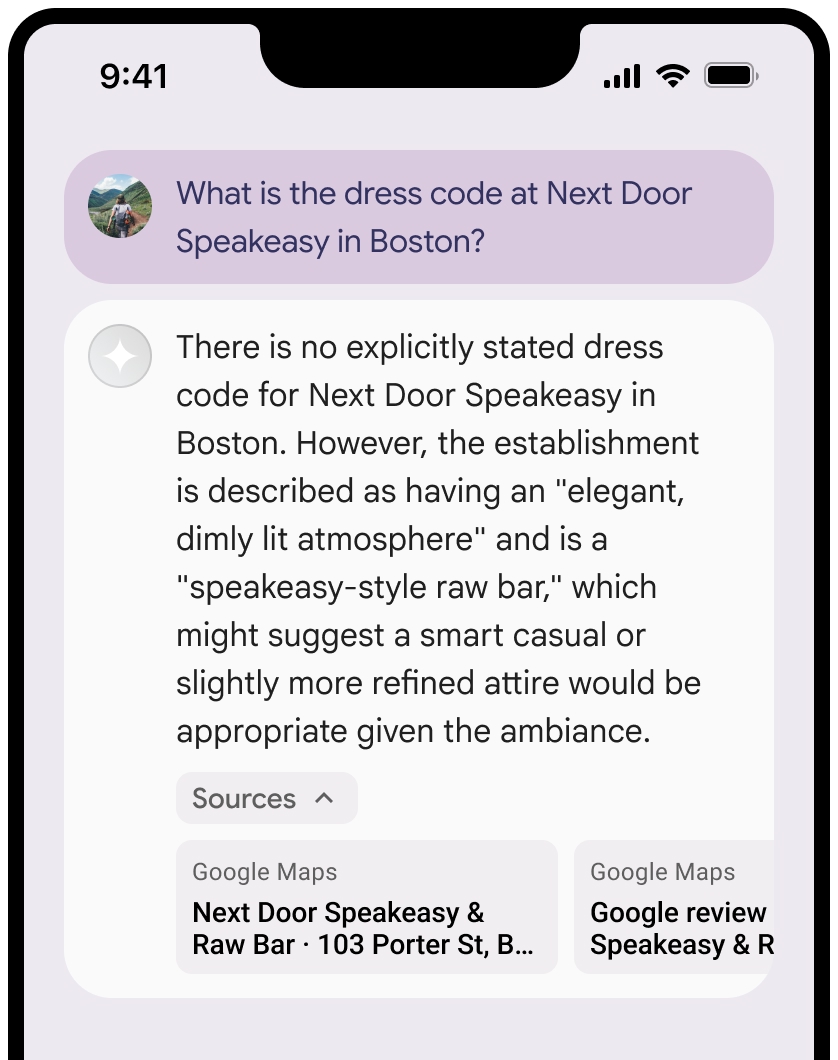
אתם יכולים לכווץ את תצוגת המקורות.
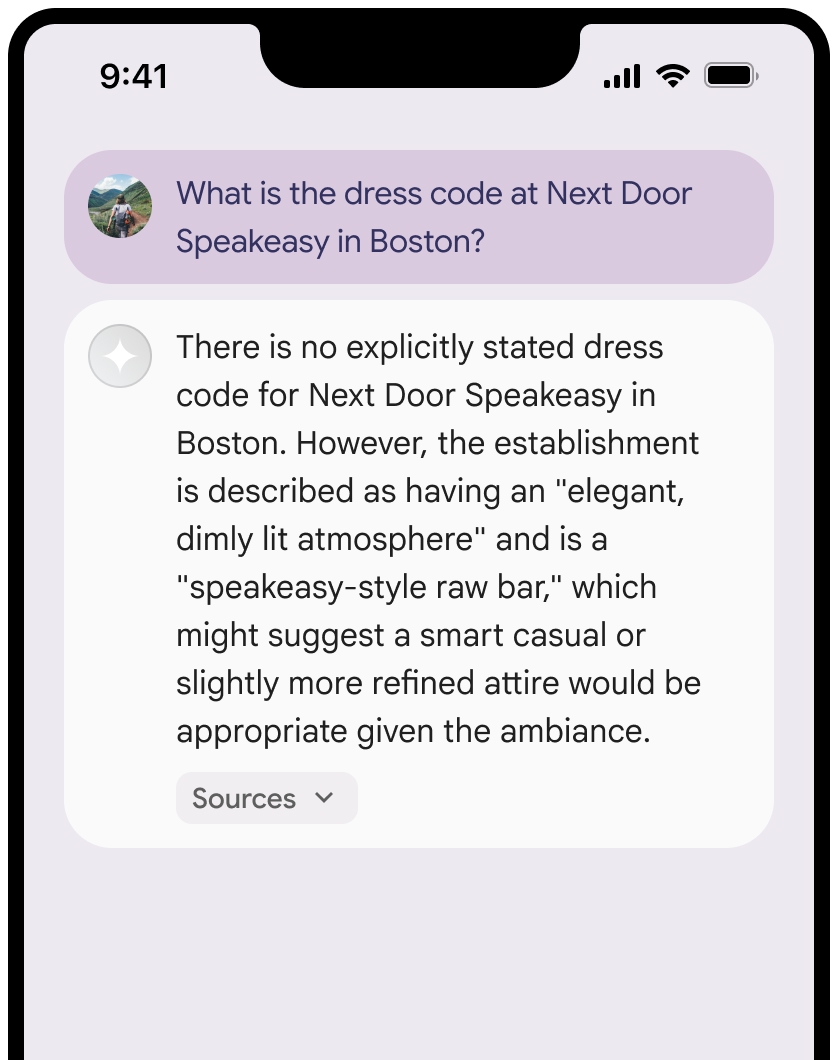
אפשר גם להוסיף לתצוגה המקדימה של הקישור תוכן נוסף, כמו:
- סמל אתר
Google Maps שמופיע לפני שיוך הטקסט שלGoogle Maps . - תמונה מכתובת ה-URL של המקור (
og:image).
מידע נוסף על חלק מספקי הנתונים של
Google Maps הנחיות לציון קרדיט בטקסט
כשמציינים את
אל תשנו את הטקסט
Google Mapsבשום צורה:- אין לשנות את האותיות הרישיות בטקסט
Google Maps. - אל תעבירו את הטקסט
Google Mapsלכמה שורות. - אל תתרגמו את הטקסט
Google Mapsלשפה אחרת. - כדי למנוע מדפדפנים לתרגם את הטקסט
Google Maps, משתמשים במאפיין ה-HTMLtranslate="no".
- אין לשנות את האותיות הרישיות בטקסט
מעצבים את הטקסט
Google Mapsכמו שמתואר בטבלה הבאה:נכס סגנון משפחת גופנים Roboto. לא חובה לטעון את הגופן. משפחת גופנים חלופית כל גופן sans serif לגוף הטקסט שכבר נמצא בשימוש במוצר, או "Sans-Serif" כדי להפעיל את גופן ברירת המחדל של המערכת סגנון הגופן רגיל עובי הגופן 400 צבע גופן לבן, שחור (#1F1F1F) או אפור (#5E5E5E). לשמור על ניגודיות נגישה (4.5:1) ביחס לרקע. גודל הגופן גודל גופן מינימלי: 12sp
גודל גופן מקסימלי: 16sp
מידע נוסף על sp זמין בקטע Font size units (יחידות של גודל גופן) באתר Material Design.ריווח רגיל
דוגמה ל-CSS
קוד ה-CSS הבא מציג את הטקסט Google Maps בסגנון הטיפוגרפי ובצבע המתאימים על רקע לבן או בהיר.
@import url('https://fonts.googleapis.com/css2?family=Roboto&display=swap');

.GMP-attribution {
  font-family: Roboto, Sans-Serif;
  font-style: normal;
  font-weight: 400;
  font-size: 1rem;
  letter-spacing: normal;
  white-space: nowrap;
  color: #5e5e5e;
}
שמירת מזהה המקום במטמון
התוצאה המאומתת של
placeId
ההגבלות על שמירה במטמון בתנאים של "עיגון בעזרת מפות Google" לא חלות על הנתונים האלה.
פעילות ואזורים אסורים
כדי לשמור על פלטפורמה בטוחה ואמינה, יש הגבלות נוספות על ביסוס עובדות באמצעות
לא להשתמש ב-Grounding with
Google Maps לפעילויות בסיכון גבוה, כולל שירותי תגובה למקרי חירום.לא להפיץ או לשווק את האפליקציה שמציעה ביסוס באמצעות
Google Maps בטריטוריה אסורה. מידע נוסף זמין במאמר אזורים אסורים ב-Google Maps Platform. רשימת האזורים האסורים עשויה להתעדכן מעת לעת.
תוצאות מבוססות-קרקע ומעקב אחרי שימוש בתכונות AI במסוף Firebase
אם הפעלתם את המעקב אחרי שימוש בתכונות AI במסוף Firebase, התשובות נשמרות ב-Cloud Logging. כברירת מחדל, הנתונים האלה נשמרים למשך 30 יום.
אתם צריכים לוודא שתקופת השמירה הזו, או כל תקופה מותאמת אישית שתגדירו, תואמת באופן מלא לתרחיש השימוש הספציפי שלכם ולכל דרישות תאימות נוספות של ספק Gemini API שבחרתם: Gemini Developer API או Agent Platform Gemini API (formerly Vertex AI) (ראו את הקטע תנאי השירות בתנאים הספציפיים לשירות). יכול להיות שתצטרכו לשנות את תקופת השמירה ב-Cloud Logging כדי לעמוד בדרישות האלה.
תמחור ומגבלות קצב של יצירת בקשות
התמחור של עיגון בנתונים באמצעות
חשוב לקרוא את הפרטים על המחיר, זמינות המודלים והמגבלות של ביסוס באמצעות