

העיגון באמצעות
לביסוס בעזרת
- לשפר את הדיוק העובדתי: להפחית את ההזיות של המודל על ידי ביסוס התשובות על מידע מהעולם האמיתי.
- גישה למידע בזמן אמת: מענה על שאלות לגבי אירועים ונושאים עדכניים.
- לספק מקורות: כדי לבנות אמון בקרב המשתמשים או לאפשר להם לגלוש באתרים רלוונטיים, כדאי להציג את המקורות לטענות של המודל.
- להשלים משימות מורכבות יותר: לאחזר פריטים ותמונות, סרטונים או מדיה אחרת שרלוונטיים כדי לעזור במשימות חשיבה.
- לשפר תשובות ספציפיות לאזור או לשפה: למצוא מידע ספציפי לאזור או לעזור בתרגום מדויק של תוכן.
מודלים נתמכים
gemini-4-argon-
gemini-3.8-flash(והגרסאות הישנות יותרgemini-3.7-flash,gemini-3.6-flashו-gemini-3.5-flash) -
gemini-3.5-flash-lite(והגרסה הישנה יותרgemini-3.1-flash-lite) gemini-nano-banana-2.1(Nano Banana 2.1)gemini-3.1-flash-image(Nano Banana 2)gemini-3-pro-image(Nano Banana Pro)
גם המודלים gemini-3.1-pro-preview ו-Gemini 2.5 לשימוש כללי (שיצאו משימוש) תומכים ביכולת הזו.
גם המודלים של Gemini Live API תומכים ביכולת הזו, אבל כל דוגמאות הקוד במדריך הזה מיועדות למודלים של Gemini לשימוש כללי.
שפות נתמכות
השפות הנתמכות במודלים של Gemini.
איך מבססים את המודל באמצעות Google Search
|
כדי לראות תוכן וקוד שספציפיים לספק, לוחצים על הספק Gemini API בדף הזה. |
כשיוצרים את המכונה של GenerativeModel, צריך לספק את GoogleSearch בתור tool שהמודל יכול להשתמש בו כדי ליצור את התשובה שלו.
Swift
import FirebaseAILogic

// Initialize the Gemini Developer API backend service.
let ai = FirebaseAI.firebaseAI(backend: .googleAI())

// Create a `GenerativeModel` instance with a model that supports your use case.
let model = ai.generativeModel(
    modelName: "GEMINI_MODEL_NAME",
    // Provide Google Search as a tool that the model can use to generate its response.
    tools: [.googleSearch()]
)

let response = try await model.generateContent("Who won the euro 2024?")
print(response.text ?? "No text in response.")

// Make sure to comply with the "Grounding with Google Search" usage requirements,
// which includes how you use and display the grounded result
Kotlin
// Initialize the Gemini Developer API backend service.
// Create a `GenerativeModel` instance with a model that supports your use case.
val model = Firebase.ai(backend = GenerativeBackend.googleAI()).generativeModel(
    modelName = "GEMINI_MODEL_NAME",
    // Provide Google Search as a tool that the model can use to generate its response
    tools = listOf(Tool.googleSearch())
)

val response = model.generateContent("Who won the euro 2024?")
print(response.text)

// Make sure to comply with the "Grounding with Google Search" usage requirements,
// which includes how you use and display the grounded result
Java
// Initialize the Gemini Developer API backend service.
// Create a `GenerativeModel` instance with a model that supports your use case.
GenerativeModel ai = FirebaseAI.getInstance(GenerativeBackend.googleAI())
                .generativeModel("GEMINI_MODEL_NAME",
                        null,
                        null,
                        // Provide Google Search as a tool that the model can use to generate its response
                        List.of(Tool.GoogleSearch()));

// Use the GenerativeModelFutures Java compatibility layer which offers
// support for ListenableFuture and Publisher APIs
GenerativeModelFutures model = GenerativeModelFutures.from(ai);

ListenableFuture response = model.generateContent("Who won the euro 2024?");
  Futures.addCallback(response, new FutureCallback() {
      @Override
      public void onSuccess(GenerateContentResponse result) {
          String resultText = result.getText();
          System.out.println(resultText);
      }

      @Override
      public void onFailure(Throwable t) {
          t.printStackTrace();
      }
  }, executor);

// Make sure to comply with the "Grounding with Google Search" usage requirements,
// which includes how you use and display the grounded result
Web
import { initializeApp } from "firebase/app";
import { getAI, getGenerativeModel, GoogleAIBackend } from "firebase/ai";

// TODO(developer): Replace the following with your app's Firebase configuration
// See: https://firebase.google.com/docs/web/learn-more#config-object
const firebaseConfig = {
  // ...
};

// Initialize FirebaseApp
const firebaseApp = initializeApp(firebaseConfig);

// Initialize the Gemini Developer API backend service.
const ai = getAI(firebaseApp, { backend: new GoogleAIBackend() });

// Create a `GenerativeModel` instance with a model that supports your use case.
const model = getGenerativeModel(
  ai,
  {
    model: "GEMINI_MODEL_NAME",
    // Provide Google Search as a tool that the model can use to generate its response
    tools: [{ googleSearch: {} }]
  }
);

const result = await model.generateContent("Who won the euro 2024?");

console.log(result.response.text());

// Make sure to comply with the "Grounding with Google Search" usage requirements,
// which includes how you use and display the grounded result
Dart
import 'package:firebase_core/firebase_core.dart';
import 'package:firebase_ai/firebase_ai.dart';
import 'firebase_options.dart';

// Initialize FirebaseApp.
await Firebase.initializeApp(
  options: DefaultFirebaseOptions.currentPlatform,
);

// Initialize the Gemini Developer API backend service.
// Create a `GenerativeModel` instance with a model that supports your use case.
final model = FirebaseAI.googleAI().generativeModel(
  model: 'GEMINI_MODEL_NAME',
  // Provide Google Search as a tool that the model can use to generate its response.
  tools: [
    Tool.googleSearch(),
  ],
);

final response = await model.generateContent([Content.text("Who won the euro 2024?")]);
print(response.text);

// Make sure to comply with the "Grounding with Google Search" usage requirements,
// which includes how you use and display the grounded result
Unity
using Firebase;
using Firebase.AI;

// Initialize the Gemini Developer API backend service.
var ai = FirebaseAI.GetInstance(FirebaseAI.Backend.GoogleAI());

// Create a `GenerativeModel` instance with a model that supports your use case.
var model = ai.GetGenerativeModel(
  modelName: "GEMINI_MODEL_NAME",
  // Provide Google Search as a tool that the model can use to generate its response.
  tools: new[] { new Tool(new GoogleSearch()) }
);

var response = await model.GenerateContentAsync("Who won the euro 2024?");
UnityEngine.Debug.Log(response.Text ?? "No text in response.");

// Make sure to comply with the "Grounding with Google Search" usage requirements,
// which includes how you use and display the grounded result
איך בוחרים מודל שמתאימים לתרחיש לדוגמה ולאפליקציה.
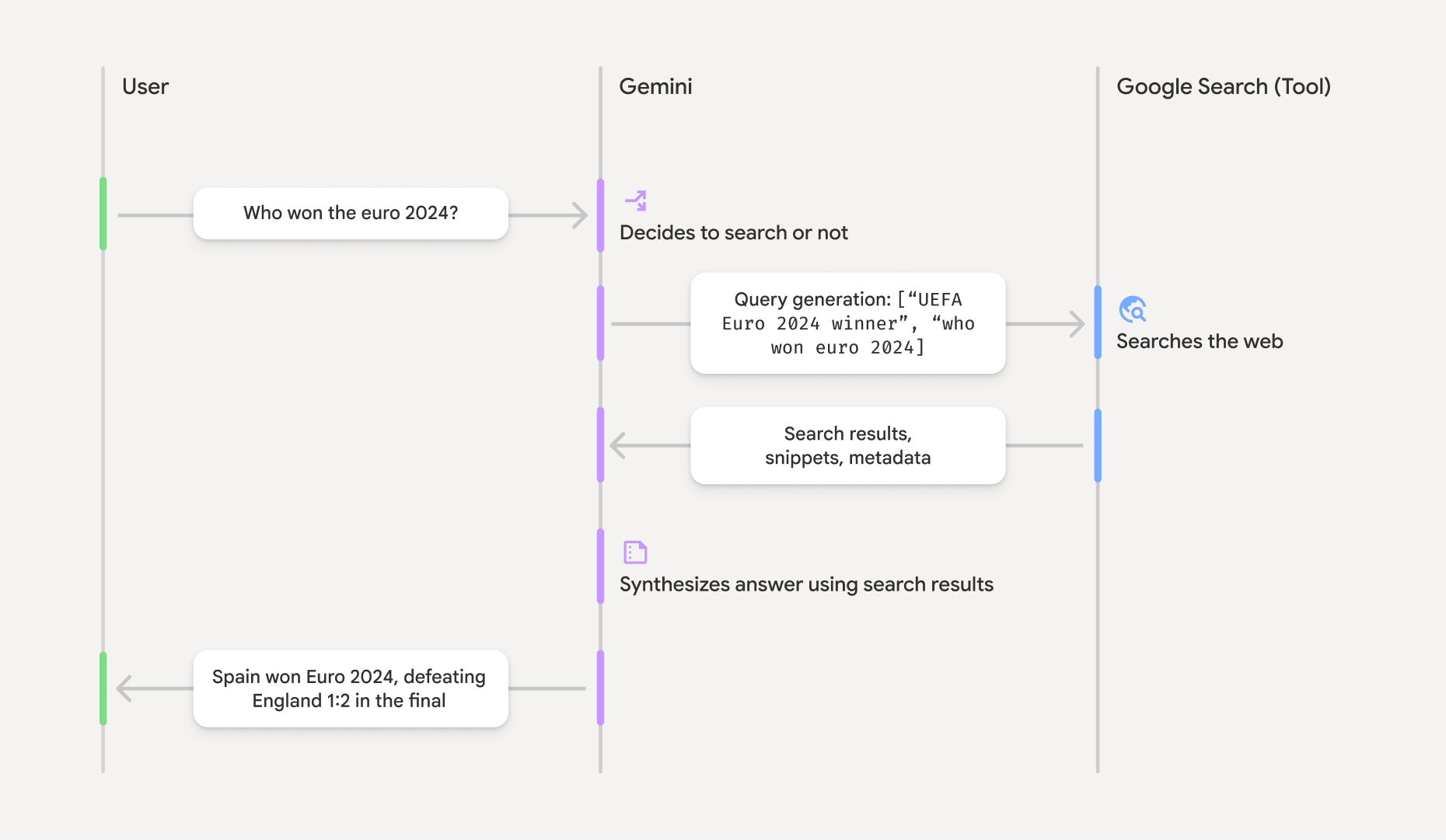
איך פועל ביסוס בעזרת Google Search
כשמשתמשים בכלי GoogleSearch, המודל מטפל בכל תהליך העבודה של חיפוש, עיבוד וציטוט מידע באופן אוטומטי.
תהליך העבודה של המודל:
- קבלת הנחיה: האפליקציה שולחת הנחיה למודל Gemini כשהכלי
GoogleSearchמופעל. - ניתוח ההנחיה: המודל מנתח את ההנחיה וקובע אם
Google Search יכול לשפר את התשובה שלו. - שליחת שאילתות אל
Google Search : אם צריך, המודל יוצר באופן אוטומטי שאילתת חיפוש אחת או יותר ומריץ אותן. - עיבוד תוצאות החיפוש: המודל מעבד את התוצאות מ-
Google Search ומנסח תשובה להנחיה המקורית. - החזרת "תוצאה מבוססת-קרקע": המודל מחזיר תשובה סופית וידידותית למשתמש שמבוססת על תוצאות
Google Search . התשובה הזו כוללת את התשובה בטקסט של המודל ואתgroundingMetadataעם שאילתות החיפוש, התוצאות מהאינטרנט והמקורות.
חשוב לזכור שגם אם מספקים למודל את groundingMetadata, ולכן היא לא "תוצאה מבוססת-קרקע".
הסבר על התוצאה המעוגנת
אם המודל מבסס את התשובה שלו על תוצאות מ-groundingMetadata שמכיל נתונים מובְנים שחיוניים לאימות טענות ולבניית חוויית מקור עשירה באפליקציה.
האובייקט groundingMetadata ב "תוצאה מעוגנת" מכיל את המידע הבא:
webSearchQueries: מערך של שאילתות החיפוש שנשלחו אלGoogle Search . המידע הזה שימושי לניפוי באגים ולהבנת תהליך החשיבה של המודל.
searchEntryPoint: מכיל את ה-HTML וה-CSS כדי להציג את "ההצעות שלGoogle Search " הנדרשות. אתם צריכים לעמוד בדרישות השימוש של "ביסוס בעזרתGoogle Search " של ספק ה-API שבחרתם: Gemini Developer API או Agent Platform Gemini API (formerly Vertex AI) (ראו את הקטע תנאי השירות בתנאים הספציפיים לשירות). בהמשך הדף מוסבר איך משתמשים בתוצאה מעוגנת ומציגים אותה.
groundingChunks: מערך של אובייקטים שמכילים את המקורות באינטרנט (uriו-title).
groundingSupports: מערך של קטעים לקישור התשובה של המודלtextלמקורות ב-groundingChunks. כל קטע מקשר בין טקסטsegment(שמוגדר על ידיstartIndexו-endIndex) לביןgroundingChunkIndicesאחד או יותר. השדה הזה עוזר לכם ליצור קישורים למקורות בגוף הטקסט. בהמשך הדף מוסבר איך משתמשים בתוצאה מעוגנת ומציגים אותה.
זוהי דוגמה לתשובה שכוללת אובייקט groundingMetadata:
{
  "candidates": [
    {
      "content": {
        "parts": [
          {
            "text": "Spain won Euro 2024, defeating England 2-1 in the final. This victory marks Spain's record fourth European Championship title."
          }
        ],
        "role": "model"
      },
      "groundingMetadata": {
        "webSearchQueries": [
          "UEFA Euro 2024 winner",
          "who won euro 2024"
        ],
        "searchEntryPoint": {
          "renderedContent": "<!-- HTML and CSS for the search widget -->"
        },
        "groundingChunks": [
          {"web": {"uri": "https://vertexaisearch.cloud.google.com.....", "title": "aljazeera.com"}},
          {"web": {"uri": "https://vertexaisearch.cloud.google.com.....", "title": "uefa.com"}}
        ],
        "groundingSupports": [
          {
            "segment": {"startIndex": 0, "endIndex": 85, "text": "Spain won Euro 2024, defeatin..."},
            "groundingChunkIndices": [0]
          },
          {
            "segment": {"startIndex": 86, "endIndex": 210, "text": "This victory marks Spain's..."},
            "groundingChunkIndices": [0, 1]
          }
        ]
      }
    }
  ]
}
שימוש בתוצאה מעוגנת והצגה שלה
אם המודל משתמש בכלי groundingMetadata בתשובה.
חובה להציג הצעות של
מעבר לעמידה בדרישות השימוש בכלי
(חובה) הצגת Google Search הצעות
אם התשובה מכילה את הטקסט "
האובייקט groundingMetadata מכיל "הצעות מסוג searchEntryPoint, שכולל את השדה renderedContent שמספק עיצוב HTML ו-CSS תואם. צריך להטמיע את העיצוב הזה כדי להציג הצעות לחיפוש באפליקציה.
במסמכי התיעוד של Google Cloud מופיע מידע מפורט על הדרישות לגבי התצוגה וההתנהגות של ההצעות של
בהמשך הקטע הזה מופיעות דוגמאות קוד.
(חובה) מקורות לרשת המדיה
האובייקט groundingMetadata מכיל נתוני מקור מובְנים, ובמיוחד את השדות groundingSupports ו-groundingChunks. אתם יכולים להשתמש במידע הזה כדי לקשר את ההצהרות של המודל ישירות למקורות שלהן בממשק המשתמש (בתוך השורה ובאופן מצטבר).
בהמשך הקטע הזה מופיעות דוגמאות קוד.
דוגמאות קוד
דוגמאות הקוד האלה מספקות דפוסים כלליים לשימוש בתוצאה המעוגנת ולהצגה שלה. עם זאת, באחריותכם לוודא שההטמעה הספציפית שלכם תואמת לדרישות התאימות.
Swift
// ...

// Get the model's response
let text = response.text

// Get the grounding metadata
if let candidate = response.candidates.first,
   let groundingMetadata = candidate.groundingMetadata {
  // REQUIRED - display Google Search suggestions
  // (renderedContent contains HTML and CSS for the search widget)
  if let renderedContent = groundingMetadata.searchEntryPoint?.renderedContent {
    // TODO(developer): Display Google Search suggestions using a WebView
  }

  // REQUIRED - display sources
  let groundingChunks = groundingMetadata.groundingChunks
  for chunk in groundingMetadata.groundingChunks {
    if let web = chunk.web {
      let title = web.title  // for example, "uefa.com"
      let uri = web.uri  // for example, "https://vertexaisearch.cloud.google.com..."
      // TODO(developer): show source in the UI
    }
  }
}
Kotlin
// ...

// Get the model's response
val text = response.text

// Get the grounding metadata
val groundingMetadata = response.candidates.firstOrNull()?.groundingMetadata

// REQUIRED - display Google Search suggestions
// (renderedContent contains HTML and CSS for the search widget)
val renderedContent = groundingMetadata?.searchEntryPoint?.renderedContent
if (renderedContent != null) {
    // TODO(developer): Display Google Search suggestions using a WebView
}

// REQUIRED - display sources
val groundingChunks = groundingMetadata?.groundingChunks
groundingChunks?.let { chunks ->
  for (chunk in chunks) {
  	val title = chunk.web?.title  // for example, "uefa.com"
	val uri = chunk.web?.uri  // for example, "https://vertexaisearch.cloud.google.com..."
// TODO(developer): show source in the UI
  }
}
Java
// ...

Futures.addCallback(response, new FutureCallback() {
  @Override
  public void onSuccess(GenerateContentResponse result) {
  // Get the model's response
  String text = result.getText();

  // Get the grounding metadata
  GroundingMetadata groundingMetadata =
  result.getCandidates()[0].getGroundingMetadata();

  if (groundingMetadata != null) {
    // REQUIRED - display Google Search suggestions
  // (renderedContent contains HTML and CSS for the search widget)
    String renderedContent =
  groundingMetadata.getSearchEntryPoint().getRenderedContent();
    if (renderedContent != null) {
      // TODO(developer): Display Google Search suggestions using a WebView
    }

    // REQUIRED - display sources
    List chunks = groundingMetadata.getGroundingChunks();
    if (chunks != null) {
      for(GroundingChunk chunk : chunks) {
        WebGroundingChunk web = chunk.getWeb();
        if (web != null) {
          String title = web.getTitle();  // for example, "uefa.com"
          String uri = web.getUri();  // for example, "https://vertexaisearch.cloud.google.com..."
          // TODO(developer): show sources in the UI
        }
      }
    }
  }
  }

  @Override
  public void onFailure(Throwable t) {
  t.printStackTrace();
  }
  }, executor);
Web
// ...

// Get the model's text response
const text = result.response.text();

// Get the grounding metadata
const groundingMetadata = result.response.candidates?.[0]?.groundingMetadata;

// REQUIRED - display Google Search suggestions
// (renderedContent contains HTML and CSS for the search widget)
const renderedContent = groundingMetadata?.searchEntryPoint?.renderedContent;
if (renderedContent) {
  // TODO(developer): render this HTML and CSS in the UI
}

// REQUIRED - display sources
const groundingChunks = groundingMetadata?.groundingChunks;
if (groundingChunks) {
  for (const chunk of groundingChunks) {
    const title = chunk.web?.title;  // for example, "uefa.com"
    const uri = chunk.web?.uri;  // for example, "https://vertexaisearch.cloud.google.com..."
    // TODO(developer): show sources in the UI
  }
}
Dart
// ...

// Get the model's response
final text = response.text;

// Get the grounding metadata
final groundingMetadata = response.candidates.first.groundingMetadata;

// REQUIRED - display Google Search suggestions
// (renderedContent contains HTML and CSS for the search widget)
final renderedContent = groundingMetadata?.searchEntryPoint?.renderedContent;
if (renderedContent != null) {
    // TODO(developer): Display Google Search suggestions using a WebView
}

// REQUIRED - display sources
final groundingChunks = groundingMetadata?.groundingChunks;
if (groundingChunks != null) {
  for (var chunk in groundingChunks) {
    final title = chunk.web?.title;  // for example, "uefa.com"
    final uri = chunk.web?.uri;  // for example, "https://vertexaisearch.cloud.google.com..."
    // TODO(developer): show sources in the UI
  }
}
Unity
// ...

// Get the model's response.
var text = response.Text;

// Get the grounding metadata.
var groundingMetadata = response.Candidates.First().GroundingMetadata.Value;

// REQUIRED - display Google Search suggestions
// (renderedContent contains HTML and CSS for the search widget)
if (groundingMetadata.SearchEntryPoint.HasValue) {
    var renderedContent = groundingMetadata.SearchEntryPoint.Value.RenderedContent;
    // TODO(developer): Display Google Search suggestions using a WebView
}

// REQUIRED - display sources
foreach(GroundingChunk chunk in groundingMetadata.GroundingChunks) {
    var title = chunk.Web.Value.Title;  // for example, "uefa.com"
    var uri = chunk.Web.Value.Uri;  // for example, "https://vertexaisearch.cloud.google.com..."
    // TODO(developer): show sources in the UI
}
תוצאות מבוססות-קרקע ומעקב אחרי שימוש בתכונות AI במסוף Firebase
אם הפעלתם את המעקב אחרי שימוש בתכונות AI במסוף Firebase, התשובות נשמרות ב-Cloud Logging. כברירת מחדל, הנתונים האלה נשמרים למשך 30 יום.
אתם צריכים לוודא שתקופת השמירה הזו, או כל תקופה מותאמת אישית שתגדירו, תואמת באופן מלא לתרחיש השימוש הספציפי שלכם ולכל דרישות תאימות נוספות של ספק Gemini API שבחרתם: Gemini Developer API או Agent Platform Gemini API (formerly Vertex AI) (ראו את הקטע תנאי השירות בתנאים הספציפיים לשירות). יכול להיות שתצטרכו לשנות את תקופת השמירה ב-Cloud Logging כדי לעמוד בדרישות האלה.
תמחור ומגבלות
חשוב לבדוק את המחירים, את זמינות המודלים ואת המגבלות של ביסוס בעזרת